

Sidebars, modals, dropdowns, search, notifications and resizing
These functions let your app open Pipefy's own UI surfaces — sidebars, modals, dropdowns and search panels — and show notifications, so your app looks and behaves like the rest of the product.
Everything a surface renders is a page of your own, loaded in a new iframe. That page calls PipefyApp.init() to get its own client. See Client SDK overview.
Some of these only work on certain surfaces
The
PipefyApp.*functions at the bottom of this page are mount-point specific. Where each function works has the full table.
Sidebars
p.sidebar({ title, url })
Opens a sidebar docked to the side of the pipe. Pass the iframe URL and the sidebar title.
p.sidebar({
  title: 'Sidebar with Flags',
  url: './sidebar.html',
});
p.closeSidebar()
Closes the sidebar in the current context.
p.closeSidebar();
Modals
p.modal({ url, width, height })
Opens a centred modal. Pass the iframe URL plus the width and height.
Options
- url: Relative URL to the page rendered inside the modal
- height: Modal height — pixels or percentage, e.g.
500pxor50% - width: Modal width — pixels or percentage, e.g.
500pxor50% - callback (optional): Function invoked when the modal closes
Example
p.modal({
  url: './modal.html',
  height: '70%',
  width: '70%',
});
You can resize the modal after it opens with PipefyApp.resizeTo.
p.closeModal()
Closes the modal in the current context.
p.closeModal();
Dropdowns
p.dropdown(options)
Opens a dropdown. Every dropdown takes a title. You then choose one of two modes:
- pass
itemsfor a simple list of options, each with its own callback, or - pass
urlto render a page of your own inside the dropdown.
Examples
// A simple list of items with callbacks
p.dropdown({
  title: 'Emoji app',
  items: [
    {
      title: '😈  Set Card Emoji',
      callback: function (p) { /*...*/ },
    },
    {
      title: '😎  Open Modal',
      callback: function (p) { /*p.modal(...)*/ },
    },
    {
      title: '👋  Close card',
      callback: function (p) { p.closeCard(); },
    },
  ],
});

// Rendering your own iframe instead of a list
p.dropdown({
  title: 'Select Card Emoji',
  url: './set-emoji.html',
  height: '500px',
});
Each item takes a title and a callback. The callback receives the client, and is a good place to call p.closeDropdown() once you have handled the click.
For an iframe dropdown, you can resize it after it opens with PipefyApp.resizeTo.
p.closeDropdown()
Closes the dropdown in the current context. Useful at the end of an item callback.
p.closeDropdown();
p.search(options)
Opens a dropdown with Pipefy's search UI already built in. You supply the items for a given query — filter a local list in JavaScript, or forward the query to an external API.
Parameters
- title: Title displayed at the top of the dropdown
- placeholder: Placeholder shown inside the search input
- empty: Text shown when no items are returned
- loading: Text shown while the promise is unresolved
- items: Function receiving
(p, query). Returns aPromiseresolving to an array of items, each withtitleandcallback.
Example
var transformToSearchItem = function (emoji) {
  return {
    title: emoji.name + ' ' + emoji.emoji,
    callback: function (p) {
      // ...
    },
  };
};

p.search({
  title: 'Select Emoji',
  placeholder: 'Search Emoji',
  empty: 'No Emoji found',
  loading: 'Looking for Emoji...',
  items: function (p, query) {
    return new Promise(function (resolve) {
      if (query && query.length) {
        var filtered = window.emojis_urls.filter(function (emoji) {
          return emoji.name.toLowerCase().indexOf(query.toLowerCase()) >= 0;
        });

        resolve(filtered.map(transformToSearchItem));
      } else {
        resolve(window.emojis_urls.map(transformToSearchItem));
      }
    });
  },
});
If items forwards the query to an external API, reject or resolve to an empty array on failure — an unhandled rejection leaves the dropdown showing your loading text indefinitely.
Cards
p.closeCard()
Sends a message to Pipefy to close the currently open card.
p.closeCard();
p.openCard(id)
Sends a message to Pipefy to open a card by ID.
p.openCard('23123');
Does nothing when your app is running inside an open card
When the surface your app is mounted on lives inside an already-open card,
p.openCard()opens nothing. It logs this to the console and resolves toundefined:
The UI function p.openCard(id) can't be called inside the new card.Since it is the card context itself that disables it, this is rarely what you want there anyway. If you need to send a user to a different card from inside one, render an ordinary link to the card's URL — that works everywhere.
Notifications
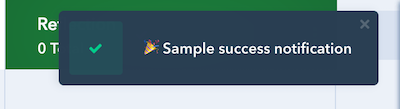
p.showNotification(text, type)
Shows an in-app notification using Pipefy's own notification UI.
Parameters
- text: The notification message
- type:
errorshows the error style. Anything else — includingwarning,info, a typo, or omitting it — renders as a success notification. There are only these two styles, so don't expectwarningorinfoto look distinct.
p.showNotification('🎉 Sample success notification', 'success');
p.showNotification('😢 Sample error notification', 'error');
Authentication
If your app talks to a third-party service that needs OAuth, these two functions handle the popup flow.
p.getAuthToken()
Returns a Promise resolving to an authentication token for the current user, which you can forward to your own backend to identify who is using the app.
p.getAuthToken().then(function (token) {
  return fetch('https://my-app.example.com/session', {
    method: 'POST',
    headers: { 'Content-Type': 'application/json' },
    body: JSON.stringify({ token: token }),
  });
});
p.oAuthAuthorize(url, dimensions)
Opens url in a popup window sized to dimensions, and returns a Promise resolving to the authorization code the provider sends back.
p.oAuthAuthorize('https://github.com/login/oauth/authorize?client_id=...', {
  width: '600px',
  height: '700px',
}).then(function (code) {
  // Exchange the code for a token on your backend, then store it per user
  return p.set('pipe', 'private', 'token', code);
});
Store the resulting token with p.set() using private visibility, so it stays scoped to the user it belongs to.
The page the provider redirects back to is your own, and it must call PipefyApp.onFinishAuthentication(code) to hand the code back to the popup's opener.
PipefyApp functions
The functions above hang off the client (p). The ones below hang off the PipefyApp global itself, and each is only available on certain mount points — see Where each function works.
PipefyApp.render(callback)
Tells Pipefy your page has finished loading, then runs callback.
Card tabs and pipe views must call this. Pipefy waits for it before revealing your content, so:
- a card tab that never calls it does not display,
- a pipe view that never calls it sends the user back to the Kanban board.
Call it once, after your app has mounted, and do your setup work inside the callback:
var p = PipefyApp.init();

PipefyApp.render(function () {
  p.card().then(function (card) {
    document.getElementById('title').textContent = card.title;
  });
});
Use
PipefyApp.render(), notp.render()
p.render()exists on the client object but is broken in every context. It fails inside Pipefy rather than in your page, so it returns a rejected promise instead of throwing where you called it — which means a missing.catch()turns it into a silent unhandled rejection, and your page never renders with no obvious clue why.PipefyApp.render()is the working path. Earlier versions of this page documentedp.render()as "Building..."; it was never completed and should not be used.
PipefyApp.resizeTo(selector)
Resizes the current iframe to match the width and height of the element matched by selector. It also keeps watching that element, so the iframe follows when your content grows or shrinks.
PipefyApp.resizeTo('#attachments');
Only ID selectors work
selectormust be a single#id, as in'#root'. Any other selector — a class, a tag, an attribute selector — throws aTypeError. So does an#idthat matches no element. Give the element you want to size against anid, and make sure it exists before you call this.
Available in card tabs, modals and iframe dropdowns. Unlike the client functions, this one runs entirely in your own page, so failures throw synchronously where you called them — including in sidebars and pipe views, which have no resizable frame. A common pattern is to call it once against your app's root element:
PipefyApp.resizeTo('#root');
PipefyApp.client()
Returns the current client without re-initialising it. Useful in a module that needs p but is not the code that called PipefyApp.init().
var p = PipefyApp.client();
PipefyApp.onCardDragStart(callback) · PipefyApp.onCardDragEnd(callback) · PipefyApp.onCardDrop(callback)
Sidebars only. Register callbacks for the card drag-and-drop lifecycle on the pipe's Kanban board, which lets a sidebar act as a drop target.
PipefyApp.onCardDragStart(function () {
  document.body.classList.add('drop-target-active');
});

PipefyApp.onCardDragEnd(function () {
  document.body.classList.remove('drop-target-active');
});

PipefyApp.onCardDrop(function (payload) {
  console.log('card dropped', payload);
});
PipefyApp.registerListener(eventName, callback)
Pipe views only. Subscribes to product events on the current pipe, so a pipe view can refresh itself without polling.
eventName | Fires when | Callback receives |
|---|---|---|
onCardCreated | A card is created in the pipe | { internalId, id } — id is the card's short ID |
onCardDeleted | A card is deleted | { internalId, id } |
onCardUpdated | A card's due date changes | { internalId, id } |
onFilterChanged | The user changes the pipe's filters | The filter set |
PipefyApp.registerListener('onCardCreated', function (card) {
  addRow(card.id);
});

PipefyApp.registerListener('onFilterChanged', function (filters) {
  applyFilters(filters);
});
Register one listener per event name. Note that onCardUpdated only covers due-date changes today, not arbitrary field edits — poll or re-query if you need to react to those.
PipefyApp.pipeFilter(pipeId)
Pipe views only. Applies the pipe's current filter set to the given pipe, so your view shows the same subset of cards the user has filtered to elsewhere.
PipefyApp.pipeFilter(p.app.pipeId);
PipefyApp.oAuthRedirect()
OAuth popup only. Call this from the page a third-party provider redirects back to, to re-establish the channel to the window that opened it. PipefyApp.onFinishAuthentication() calls it for you, so you rarely need it directly.
PipefyApp.onFinishAuthentication(code)
OAuth popup only. Hands the authorization code back to the p.oAuthAuthorize() promise in your app, then closes the loop.
// On your OAuth callback page
var code = new URLSearchParams(window.location.search).get('code');
PipefyApp.onFinishAuthentication(code);
See also
- Where each function works — the mount-point availability table
- Get Pipefy data — read the current card, pipe and fields
- Custom App Data — store data and attach links