

How to translate a Workato recipe into an iPaaS flow and import the JSON into a pipe.
This kit turns a Workato recipe into a Pipefy Integrations flow. You run it on your machine (Cursor, Claude Code, or Codex) and import flow.json into the pipe that should own the automation.
The kit is the main branch of pipefy/ipaas-migrator. Its version is the VERSION file on that branch.
After import, connections, Service Accounts, and tests follow the Integrations docs.
You need to be an admin of that pipe, with Integrations enabled on the org. The Pipefy connector uses a Service Account, not your personal login. See Getting started with Pipefy's Integrations.
What the kit does
- Installs the Node.js engine and the agent skill.
- Reads the recipe from your Workato API client or from a
.jsonfile. - Writes
flow.json(plus a named<slug>.flow.jsoncopy), a diagram, and a description. If you pasteConnection: <id>, the flow is already wired. - Shows how to import: pipe, Integrations, Import.
It does not publish the flow, pick the pipe, or finish OAuth. Without a connection id, connect accounts in the panel after import and test the trigger.
What you need
| Requirement | Details |
|---|---|
| Agent | Cursor, Claude Code, or Codex. ChatGPT and Claude.ai cannot run the script. |
| Node.js 18.17+ | If the machine blocks installs, talk to IT. |
| Recipe | A Workato API client, or the JSON with a code field. |
| Pipefy | Integrations on the org, admin on the destination pipe. |
1. Install
Clone or download the repository:
git clone https://github.com/pipefy/ipaas-migrator.git
Open the folder in Cursor, Claude Code, or Codex and paste:
Install the migrator with browser and let's migrate a recipe.
At the start, the agent compares the local VERSION with GitHub main and warns if main is newer. It continues either way, including when the check cannot reach GitHub. It announces the kit ready only after the engine smoke test passes.
The agent infers the language (português, English, español) from the chat and asks only when it is ambiguous. Then it asks how you will provide the recipe.
Chrome opens only after the agent explains it and you say yes. You sign in yourself. After sign-in, the agent explains Pipefy MCP and asks again. Without that OK, it follows the Import screenshot in step 4.
2. Recipe source
Pick one.
Workato API client
The kit calls the Developer API (GET /api/recipes) with a Bearer token from an API client. Legacy x-user-token keys do not work.
- In Workato, open Workspace admin, API clients.
- Create a client that can read recipes, with the right project scopes.
- In the chat, say you will use a key. The agent opens
.envin your editor (Notepad on Windows). - Paste the token into
WORKATO_API_KEY=. No quotes. NoBearerprefix. - Go back to the chat and say the key is ready. Do not paste the token in the chat.
Default URL: https://www.workato.com/api. EU workspace: set WORKATO_API_BASE=https://app.eu.workato.com/api in .env. Other regions: base URLs.
Who can create API clients: workspace root email, Environment admin/Admin, or a custom role with the clients privilege. See How to generate an API token.
JSON file
Send the recipe .json in the chat. It is the object from GET /api/recipes/:id and it must include code.
If you have a Workato .zip export, extract it and send the recipe .json, not connection.json.
3. Translate
With an API key, the agent lists id, name, and trigger, then asks which recipe to migrate. With a file, it uses the JSON you sent.
It shows a short summary and waits for you to confirm before translating.
Files land in output/<id>/:
| File | Use |
|---|---|
flow.json | Translated flow |
<slug>.flow.json | Named copy of flow.json for this recipe. Import this one |
recipe_diagram.png | Recipe diagram. Produced only with mmdc and local Chrome; otherwise translation continues without an image |
recipe_description.md | What the recipe does. Always written |
routing.json | ipaas_ready or manual_revision |
If a Workato operation has no map, routing.json is manual_revision and blocked_reason says why. The description is still written, and the diagram is best-effort (see the recipe_diagram.png row). The kit does not send Mermaid to Kroki. The engine does not invent iPaaS pieces.
4. Import
In Pipefy, open the pipe for the automation:
- Select the pipe (you must be an admin).
- Click Integrations.
- Under Build a Flow, click Import and choose the
<slug>.flow.jsonfor this recipe (the named copy next toflow.json).
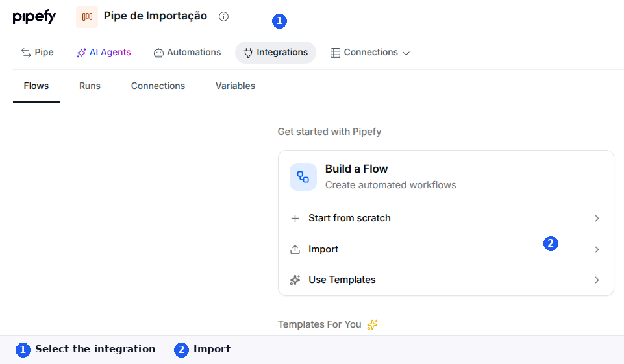
Review the canvas and connections. Do not publish until you have tested.
If the iPaaS connection already exists on that pipe, paste the id in chat (before or after translating):
Connection: <id>
Conexão: and Conexión: also work. Several ids: one line each, or Connection Slack: <id>. flow.json comes out with auth already set. Import into the same pipe as that connection.
You can also build a flow from scratch or from a template. This kit only covers Import of the translated JSON.
5. After import
- Without
Connection: <id>: on the Pipefy connector, create or reuse a connection with a Service Account (Client ID and Client Secret). That account needs access to the pipe. See Getting started with Pipefy's Integrations. - For other connectors (Slack, Google Sheets, HTTP), authenticate in the flow panel anything still missing from the prompt.
- Test the trigger with a real event in the pipe (create or move a card, change a field). Without that, the test does not load card data. See Introduction to Pipefy's Integrations.
HTTP Request does not reuse credentials across flows in the same pipe. Other authenticated connections do.
The "24 hours" notice on the Service Account screen is the lifetime of the generated token, not of the account. The pipe that hosts the flow can be different from the pipe whose cards the recipe touches.
Common problems
| Error | What to check |
|---|---|
missing_token | WORKATO_API_KEY in .env. Do not paste the key in chat. |
unauthorized or 401 | API client token, role, and project scope. |
not_found or 404 | The recipe ID belongs to that workspace. |
tsx_missing | Ask the agent to install again. |
manual_revision | blocked_reason in routing.json. |
| No Integrations tab | Integrations app on the org; you are an admin of that pipe. |
| Trigger test does nothing | Do the action in the pipe (create, move, update a field). |
| Flow has empty connections | Paste Connection: <id> in chat and translate again, or connect in the panel. |